The quick answer
Chrome DevTools for agents now includes CSS inspection that can return computed and matched styles, inherited declarations and pseudo-element rules. For teams reviewing AI-built sites, that gives a coding agent more concrete evidence when investigating a layout defect. Chrome describes the feature in its November notes, published October 20, 2026. Chrome release notes
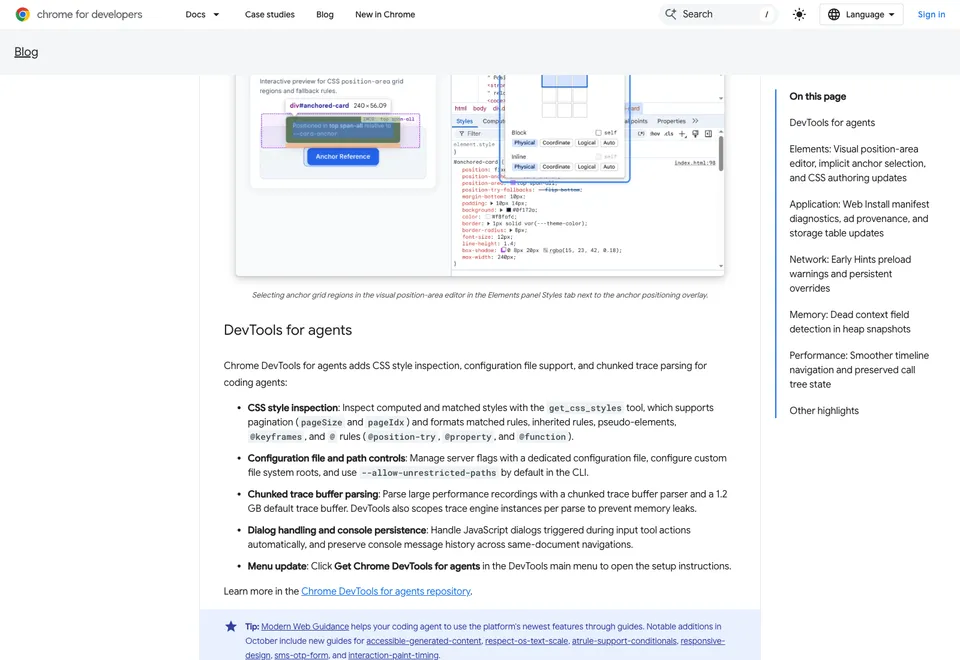
Chrome DevTools for agents now includes CSS inspection that can return computed and matched styles, inherited declarations and pseudo-element rules. For teams reviewing AI-built sites, that gives a coding agent more concrete evidence when investigating a layout defect. Chrome describes the feature in its November notes, published October 20, 2026. Chrome release notes
Start with a visible defect
Consider a fictional booking page whose date selector extends beyond the right edge on a small screen. Record the page URL, viewport width, browser version and exact action that reveals the problem. Include whether a cookie notice or expanded menu is visible. A screenshot documents the symptom, while the element and its styles help explain it.
Ask the agent to inspect the selector and its containing block. Request the computed width and minimum width, the matching declarations for those properties and the rules supplying them. Check the parent layout as well. A child can overflow because its parent allocates too little room or because an intrinsic size prevents shrinking.
Turn the observation into a small test
Suppose inspection shows a minimum width applied by a shared component class. Treat that as a hypothesis about the cause. Ask for the smallest change that makes the control fit while preserving the labels and interaction. Inspect which rule wins after the change and repeat the action that originally revealed the defect.
Compare the booking form at a narrow width, a wider mobile width and desktop. Open the date selector, select a date and confirm that the selected value remains visible. Use the keyboard through the same sequence. A change that fixes the initial screenshot still needs those functional checks.
Ask for evidence you can review
Give the agent a bounded request that includes the page and state. For the fictional booking page, a request could read “At a 390px viewport, inspect the date selector and its parent after opening the calendar. Report their computed width, minimum width and box sizing. Identify the matching rules that supply those values. Propose one change and explain which observation would support it.” This makes the requested output concrete enough to check against the browser.
Chrome calls the inspection tool get_css_styles and documents pagination for large rule sets. If the output stops before the relevant declarations, ask the agent to retrieve the remaining rules. Include the selected element and active viewport with the result so a reviewer can reproduce the context. Availability depends on the connected tool version. Check its advertised tools before asking it to inspect the page. Chrome release notes
Keep the handoff specific
Record the element, the winning declaration, the proposed change and the viewports checked. Attach the before and after observations to the code review. If the agent cannot inspect the page, preserve the hypothesis as pending until a reviewer can reproduce it. The workflow here is a review framework with a fictional example. No booking form was tested for this article.
For a static review before browser investigation, use our Modern Web Guidance audit guide. For a slow page, keep the trace and repeated measurements together using the performance investigation worksheet.

The Blitz Studio team
We design brands, build websites and engineer digital products.
Talk about your next project