The quick answer
Framer’s November 2, 2026 localization update adds a Content panel for managing pages, collections and components across locales. It lets teams include content, keep it untranslated or hide it, with options for applying preferences in bulk. For a business introducing a second language, the practical starting point is one complete visitor journey that the team can maintain. Framer’s localization update
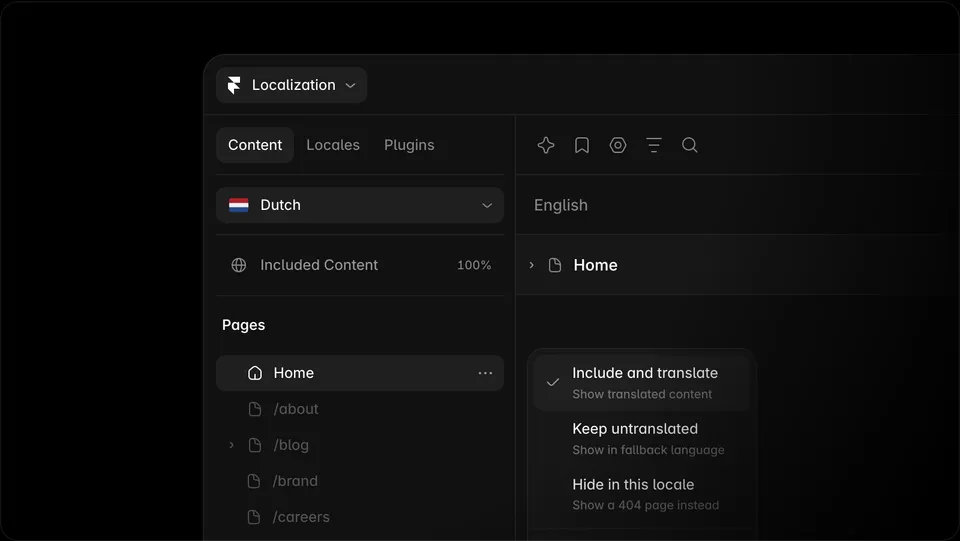
Framer’s November 2, 2026 localization update adds a Content panel for managing pages, collections and components across locales. It lets teams include content, keep it untranslated or hide it, with options for applying preferences in bulk. For a business introducing a second language, the practical starting point is one complete visitor journey that the team can maintain. Framer’s localization update
Choose a small journey with a clear endpoint
Imagine a fictional independent bookshop adding French content for visitors who want to reserve a book for collection. Its first release could cover the home page, collection instructions and the reservation form. Each step needs a working destination. A translated home page that sends visitors to unexplained instructions in another language leaves the task unfinished.
List every destination along that path, including shared navigation, form labels, confirmation messages and the contact route. Assign an owner to each item. Keep the first release small enough that a fluent reviewer can follow it from arrival through confirmation.
Use the panel to implement your content plan
The new Content panel gives an overview across locales, including pages, collections and components. Framer also offers a choice when adding a locale to include all content by default or keep it untranslated. Record which option you selected before making bulk changes. Apply one known item first and inspect the result before extending the same preference to a larger group. Framer’s localization update
Adding a locale brings translatable strings such as page titles, descriptions and image alt text into the localization workflow. Framer documents manual entry and AI Translation, along with a fallback language for missing translations. Review what a visitor actually sees when a string is missing. Record the fallback outcome as part of the release decision. Framer’s locale setup guide
For the bookshop, an event archive might be outside the first release. The team should decide whether that content stays available with a fallback or is hidden in the added locale. Document the intended behavior for its links as well as its page.
Check the consequence of hiding a page
Framer’s help article says that a hidden page returns a 404 in that locale and that the locale picker updates for the affected page. Before hiding something linked from a translated page, decide where that link should lead. Then open the actual locale URL and follow the navigation from a neighboring page. A hidden destination needs the same review as the visible content around it. Framer’s locale exclusion guide
Review the published journey
Give the reviewer the expected URLs and the intended outcome for each step. Ask them to open the locale home page directly, navigate to collection instructions, complete the form with sample data and review the confirmation. Check the language picker on each page and return through it to the original language. Include mobile navigation and any messages produced after submitting the form.
Keep a separate record for shared components so a later edit to a button or footer can reopen the affected locale reviews. If an event page changes weekly, assign someone to maintain its translation or revise the planned scope.
This is a planning workflow based on Framer’s documentation. The bookshop example is fictional, and no Framer project was configured for this article. Use the locale rollout worksheet to record scope, fallback choices and observed checks. Prepare the source copy with the website translation guide.

The Blitz Studio team
We design brands, build websites and engineer digital products.
Talk about your next project