The quick answer
Choose a WordPress theme by testing how it handles your real content, editing workflow and essential visitor tasks. Shortlist a few suitable options, compare them with the same representative pages on a test site, and reject any option that creates an unresolved operational problem. A beautiful demo is a starting point, not evidence that a theme fits your business.
Choose a WordPress theme by testing how it handles your real content, editing workflow and essential visitor tasks. Shortlist a few suitable options, compare them with the same representative pages on a test site, and reject any option that creates an unresolved operational problem. A beautiful demo is a starting point, not evidence that a theme fits your business.
Start with the website you need to operate
Before browsing theme galleries, list the pages and content types the website must support. A consultancy may need service pages, case studies and an enquiry route. A publisher needs a different approach to archives and long articles. An online shop needs product and checkout requirements that a marketing demo cannot establish.
For each content type, identify what a visitor must understand and do. Then identify who will update it. A theme that gives a developer precise control may still be a poor operational fit for a team that needs to publish changes without engineering help.
Use the website brief template to settle the audience, offer, content owners and required functions. If the wider WordPress setup is still undecided, start with our WordPress website guide.
Understand which editing model you are choosing
WordPress documents block themes as themes that use blocks throughout the site, including areas such as the header and footer. They work with the Site Editor. Classic themes use a different template approach and do not use that editor in the same way. See the official block theme explanation for the platform distinction.
For your shortlist, ask the supplier to show how an editor changes a navigation label, adjusts a page layout and updates a shared footer. Do not infer the editing experience from the public demo alone. Also check whether the proposed design depends on a separate page builder or paid extension.
Neither “block” nor “classic” is a complete quality verdict. The useful question is whether the actual implementation supports the team's content, maintenance and editing needs. Existing sites may have dependencies that make a theme change more involved than starting a new test installation.
Build a small, realistic content pack
Compare themes with the same material. Otherwise a demo with impressive photography can win over a better-fitting theme simply because the sample content looks stronger.
Prepare a homepage introduction, one detailed service, one long article, a case study and the actual navigation labels. Include a long project name, an ordinary phone photograph and a service description that needs more than two lines. These reveal the limits that perfect demo content hides.
For an illustrative local consultancy, the pack might include a 12-word service title, a three-paragraph process explanation, a client quotation that has actually been approved and a clear enquiry action. If you do not yet have approved proof, use a clearly marked placeholder in the test environment and remove it before publication.
Compare candidates on a test site
WordPress provides preview options, and its theme documentation recommends a test site for a more thorough evaluation. Do not activate a new theme on a working business website simply to see what happens.
On the test site, document the theme name, version, required extensions and which changes you made. Use representative content rather than treating the theme's preview as a finished test. Keep backups and a recovery path when evaluating a replacement for an existing site.
Create a short record for each candidate: task, observation, unresolved issue and owner. For example, “The service title wraps to four lines on a phone; readable, but it pushes the primary action below the introduction.” That is more useful than “mobile looks fine.” The example is a suggested review note, not a result from a theme we tested for this article.
Review the editing work your team repeats
Have the intended editor attempt common tasks with a small amount of guidance. Can they publish a new article, replace an image, change a service introduction and update navigation without breaking a shared layout?
- Record which controls are available and which require code or an additional product.
- Check whether reusable layouts remain consistent after ordinary content edits.
- Ask how an accidental change is recovered and what is included in handoff documentation.
- Confirm the editor can distinguish global changes from changes to one page.
Count the ongoing dependencies, not just the initial design work. A theme that needs several extensions for ordinary content changes may still be appropriate, but those extensions need owners, updates and a budget.
Check mobile behavior and keyboard tasks
Inspect the actual pages at phone, tablet and desktop widths. Test your longest headings, image captions and navigation labels. Look for sideways scrolling, clipped controls, unreadable contrast and content that disappears when its layout changes.
Then complete the key journey with a keyboard: open navigation, reach a service, follow a case-study link and start the enquiry route. Focus should be visible, controls should be reachable and a menu or dialog should have a usable exit. Also check zoom and the website's reduced-motion behavior.
These checks are useful screening work, not a complete accessibility audit. A theme listing, automated score or accessibility label does not prove that your finished content, extensions and forms are accessible. Review the assembled website, including the parts supplied by other products.
Investigate speed with the assembled page
Avoid choosing a theme solely from a screenshot of a performance score. The finished site's images, extensions, hosting, third-party scripts and content also affect the experience.
Compare representative pages under the same test conditions. Record what was loaded, where it was hosted, the device/network conditions and any unresolved bottleneck. A theme demo and a different business website are not a controlled comparison.
Ask what must remain enabled to keep the proposed design working. A large slider library, font package or animation system might be unnecessary for your content. Removing something from a demo can also change its appearance, so inspect the result rather than assuming every dependency can disappear without work.
Understand support, costs and switching later
Before committing, check the supplier's current license, update terms, support process and extension requirements. Prices and inclusions can change; obtain the actual terms for the edition you are considering. This guide does not rank vendors or assume a premium theme is automatically better than a free one.
Ask what happens to content if the theme or page builder is replaced. Which text remains in normal page content? Which layouts must be rebuilt? Which custom functions belong in a plugin or application rather than being tied to presentation? Have the implementer demonstrate the relevant behavior on the test setup.
Document who owns renewals, updates, backups and recovery after launch. A theme can fit the first design review and still be the wrong choice if nobody can operate it reliably.
Make a decision with gates, then tradeoffs
Use must-have gates first. If a candidate cannot support a required content type, essential integration or usable enquiry journey within the project's scope, it should not win because its visual demo is attractive.
Among the viable options, compare editing fit, design flexibility, maintenance effort and total operating cost. Write down the tradeoff you are accepting. “We will keep the simpler article layouts to make weekly publishing manageable” is a clearer decision than “Theme B scored 87.”
The right choice is the one your team can maintain while giving visitors a clear, usable website. Keep the test notes for handoff, then run the launch checklist against the finished build. Theme selection does not replace a launch review.
Sources and related reading
- WordPress documentation: work with themes.
- WordPress documentation: block themes.
- WordPress.com versus WordPress.org for the separate hosting/setup decision.
- The website brief template for recording requirements before comparing designs.
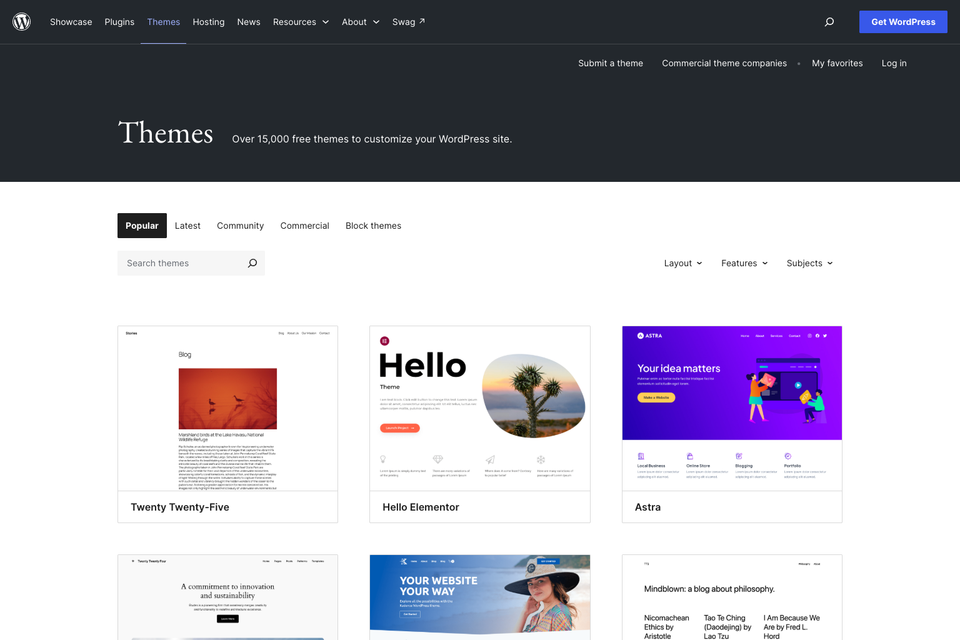
Platform documentation was checked on 27 October 2026. This is a selection framework, not a hands-on ranking of named themes. The cover shows the official WordPress.org theme directory, captured on 29 October 2026; it does not establish hands-on testing of individual themes.

The Blitz Studio team
We design brands, build websites and engineer digital products.
Talk about your next project