The quick answer
A useful error message identifies what went wrong, explains the next available step and stays within what the system actually knows. Review the trigger, message and recovery behavior together. Friendly wording alone cannot establish whether a request failed, completed or is still uncertain.
A useful error message identifies what went wrong, explains the next available step and stays within what the system actually knows. Review the trigger, message and recovery behavior together. Friendly wording alone cannot establish whether a request failed, completed or is still uncertain.
Name the problem at the right level
Start with the condition the interface has detected. A missing required field, an unsupported file and a service timeout need different explanations. Asking someone to correct their email address will not help when the real problem is an unavailable delivery service.
W3C's error-identification guidance explains the need to identify an automatically detected input error and describe it in text. A red outline on its own does not communicate the full problem.
Write the condition with the implementer before drafting the message. Record whether it was detected locally, returned by a service or inferred from a timeout. The source of the signal affects what the message can honestly say.
Offer a correction when one is known
W3C's error-suggestion guidance distinguishes identifying an input error from explaining a known correction. It also recognizes that a suggestion may be inappropriate when it would undermine the security or purpose of the content.
For a fictional enquiry form, a required-field message could identify the field and ask for the missing value. If a particular format is necessary, show an example that matches the actual accepted format. Agree that example with the implementation owner rather than borrowing one from another product.
Keep the correction close to the task. An internal exception number may help a support team, but a visitor still needs an understandable next step. If an identifier is useful, provide it alongside a real explanation and an available support path.
Learn from an actual public example
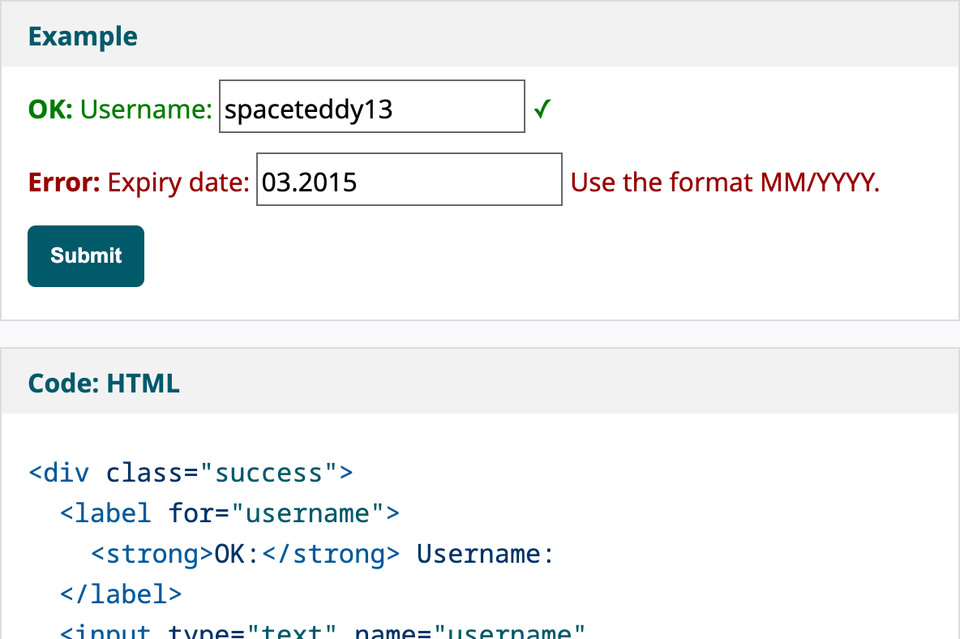
The W3C user-notification tutorial contains a prefilled form example with an expiry-date error. Its visible instruction supplies the required month-and-year format, while a neighboring username field demonstrates a different state. The cover screenshot captures that actual documentation example on 2 November 2026.
This is an observation of the supplied example, not a form submission, a study with participants or a complete accessibility test. The important editorial distinction is that the message tells the reader how the entry needs to change instead of showing an unexplained failure label.
The same tutorial describes overall error feedback and feedback near individual fields. Choose the combination that fits the actual interaction, then review how the rendered implementation associates the message with its input and makes a new state noticeable.
Distinguish an input problem from uncertain delivery
An input correction is different from an unknown submission outcome. If the system cannot establish whether a request reached its destination, it should not confidently say that nothing was sent. Nor should it report success merely because the interface stopped loading.
For a fictional service enquiry, an uncertain-outcome message might explain that confirmation is unavailable and provide an agreed way to check. The precise wording depends on the actual delivery mechanism, duplicate handling and support process. Do not promise that retrying is safe unless the system supports that behavior.
Keep success, processing and failure copy in the same specification. A team that reviews only the error paragraph may miss contradictory messages elsewhere in the journey. The form planning worksheet connects this wording to the wider submission process.
Make the recovery action match its promise
Check the destination or command behind each recovery control. Try again, Edit details and Contact support describe different actions. Use a label that predicts the immediate result, then verify that result on the built page.
If the recovery path opens a contact channel, agree who receives the message and what information the visitor should include. Do not invent an immediate response time or a support service that the business does not operate.
For a download problem, confirm whether the visitor can reopen a working file link or needs help from the content owner. For a missing page, identify a useful real destination. These are editorial applications of the recovery principle, not additional claims about the W3C input-error requirements.
Review the moment the message appears
A message may be appropriate after submission but distracting while someone is still typing. Decide which event triggers it and when it should clear. Do not leave an old error visible after the underlying problem has been corrected.
Inspect the actual page with the implementation owner. Record the visible text, association with the relevant control, focus behavior where applicable and how a dynamic update is communicated. A copy deck or screenshot alone cannot demonstrate all of that behavior.
Use meaningful text alongside visual cues. The goal is to help someone understand and recover from the condition, rather than rely on color or an icon to carry the explanation.
Keep useful input and unresolved limits in the record
Agree what the system can retain when recovery is needed, considering the information involved and the actual implementation. A reassuring promise that everything has been saved is misleading if the page discards the work on reload.
Use the website error-state planning worksheet to record the condition, known outcome, message, retained information, recovery action and evidence. Label proposed behavior separately from behavior that has actually been checked.
Before release, read the message with its recovery control and nearby success copy. Confirm that another person can follow the next step without knowing the internal cause. Record the review method and limits; do not turn a single observation into a claim of complete usability or compliance.
Sources and attribution
Screenshot attribution: W3C Web Accessibility Initiative, User Notification tutorial. Copyright © 2026 World Wide Web Consortium (W3C). Captured 2 November 2026; cropped and resized. See W3C's permission to use WAI material. No endorsement is implied.
Sources checked 2 November 2026. Enquiry and download examples are illustrative. This guide supports editorial and implementation review; it is not an accessibility certification or a claim that a live submission workflow has been tested.

The Blitz Studio team
We design brands, build websites and engineer digital products.
Talk about your next project