The quick answer
A SaaS homepage needs to make a product understandable to someone who does not share your internal context. It should explain who the product serves, what it helps them do and why taking the next step is worthwhile.
Help a visitor understand the product
A SaaS homepage needs to make a product understandable to someone who does not share your internal context. It should explain who the product serves, what it helps them do and why taking the next step is worthwhile.
Begin with the visitor's decision. Are they exploring a new category, comparing suppliers or returning to request a demo? Those situations need different amounts of explanation. One page can serve several audiences, but the primary route should remain clear.
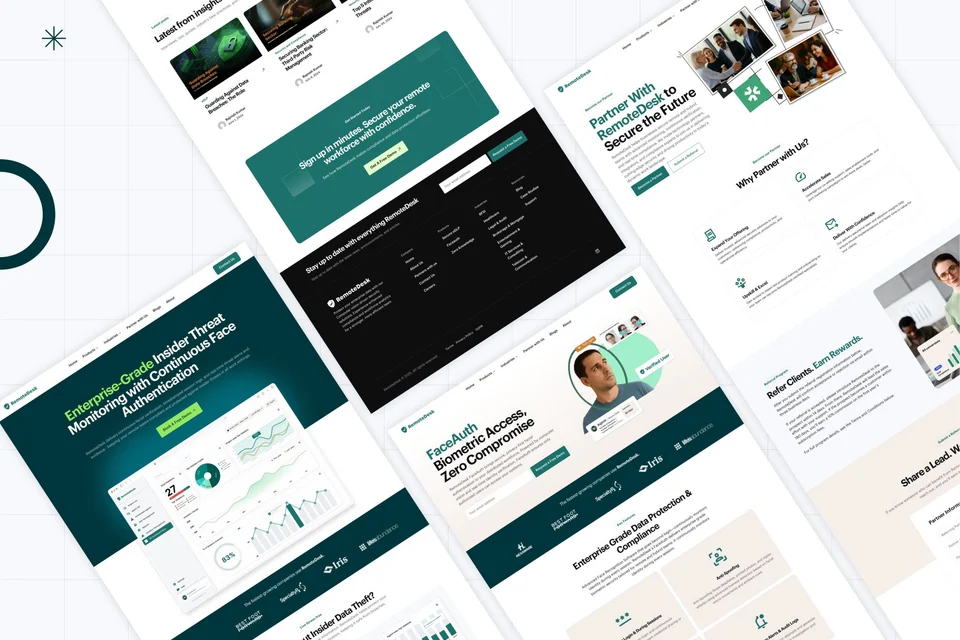
The RemoteDesk visual showcase in our portfolio is one example of how a product interface and supporting page sections can be presented. The showcase is visual evidence of design work, not a claim about conversion results.
1. A specific product promise
The opening section should state the useful outcome and enough context to identify the product. “Bring clarity to work” could describe many businesses. A more specific working example might be “Plan support shifts and see coverage gaps in one place.” This is illustrative copy for a fictional scheduling product.
Support the heading with a short explanation of the audience and core task. Avoid using a large collection of category words to stand in for a clear proposition.
Choose one primary action that matches readiness. A complex product may need a demo; a straightforward self-service product may support a trial. Make the destination match the label.
2. Product evidence visitors can read
Show the interface or workflow that supports the promise. A screenshot should be large enough to communicate something useful and accompanied by an explanation of what the visitor is seeing.
Use a focused view rather than shrinking an entire application into an unreadable thumbnail. If the interface contains customer information, use approved sample data and identify illustrative content accurately.
Video can help demonstrate a sequence, but essential information should remain available in text. Provide controls for meaningful media and respect accessibility and motion preferences.
3. A small set of meaningful capabilities
Group features around tasks. In the fictional scheduling example, “build the rota,” “spot coverage gaps” and “publish changes” form a clearer story than a long list of isolated interface features.
For each capability, explain who uses it, the problem it addresses and the action it enables. Screenshots, short examples or a process diagram can make the explanation concrete.
Do not give every feature equal prominence. Prioritize the few that explain why the product is relevant, then link to deeper information when visitors need it.
4. Proof that answers a real doubt
Use proof you can substantiate: an attributed customer quote with permission, a documented case study, a relevant security document or a recognizable integration you actually support.
Match the proof to the question. A visitor concerned about adoption needs different evidence from someone checking technical compatibility. A row of logos does not answer every objection.
Avoid invented performance numbers, unapproved customer logos or claims that imply certification without evidence. Good design makes genuine proof easier to assess.
5. A path to the next decision
Explain what happens after the main action. If someone requests a demo, tell them what the session covers and what information is needed. If they start a trial, make account creation, pricing and any conditions clear at the relevant step.
Keep the page's calls to action consistent. Secondary routes such as reading documentation or viewing pricing can help visitors who are not ready for the primary action.
Test the whole route rather than evaluating only the button. The form, validation, confirmation and follow-up handoff are part of the experience.
Use the framework as a review
- Can a new visitor explain the product after reading the first section?
- Does the product evidence demonstrate the main promise?
- Are capabilities grouped around recognizable tasks?
- Is each proof claim attributable and current?
- Does the next step clearly describe what will happen?
- Does the page remain useful on a phone, with a keyboard and without animation?
Use the website brief template to agree audience and priorities before design. Talk to Blitz Studio when you need help connecting product positioning, design and implementation.
Reference

The Blitz Studio team
We design brands, build websites and engineer digital products.
Talk about your next project