The quick answer
A/B testing starts with a decision, not a second design. If you cannot explain which visitor problem a change addresses and which action would count as progress, publishing two versions will mostly create more numbers to interpret.
A/B testing starts with a decision, not a second design. If you cannot explain which visitor problem a change addresses and which action would count as progress, publishing two versions will mostly create more numbers to interpret.
Framer currently documents built-in page experiments, conversion tracking and an analytics view for comparing variants. This guide explains how to prepare a useful experiment using that documented workflow. We have not run a Framer experiment for this article, and the examples below are fictional. Check the current product documentation and your project’s access before committing to an experiment.
Choose one question worth answering
Start with a page that has a clear next step and enough relevant visitors to support a comparison. Framer’s guidance recommends high-traffic pages because collecting useful data takes longer on quiet pages. There is no universal visitor count that makes every experiment trustworthy: the baseline action rate, size of change and decision all matter.
For a fictional software business, a useful question could be: does showing the integration requirement beside the demo button help suitable buyers complete the enquiry? That is more specific than “which homepage looks better?” The change addresses an uncertainty that could prevent a suitable visitor taking the next step.
Write down the audience, current uncertainty, proposed change and primary action. If you plan to change the headline, price, navigation and form at once, you may compare two packages, but you will have less evidence about which individual change explains a difference.
Define the conversion before making variants
Framer’s setup guide requires a page and a conversion event. Its documented options include link clicks, form submissions and subsequent page views. Choose the action that answers your actual question. A demo-button click is evidence of a click; it is not automatically a qualified lead or a sale.
If your business decision concerns enquiries, agree what happens after submission too. A higher submission rate could include irrelevant enquiries or accidental submissions. Record a secondary quality check with its owner and review period, while keeping the primary experiment action stable.
Use the same tracking ID for the equivalent link or form across variants, as Framer instructs. In its configuration, you can add several steps, but the final step is used to calculate conversions. Check that the final step is the action you intended, rather than a convenient intermediate event.
Prepare the control and changed page
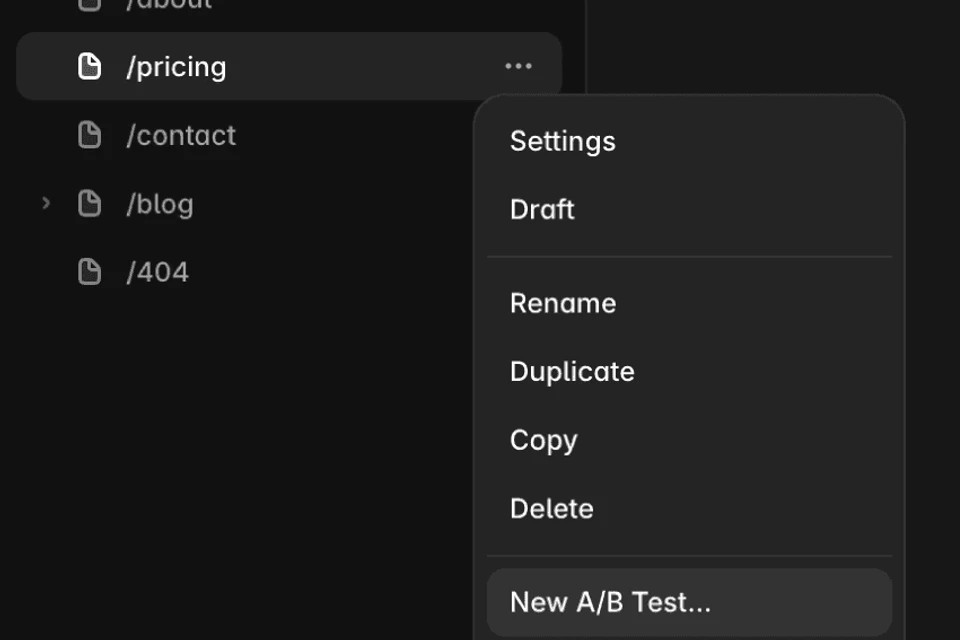
The current documented flow begins by right-clicking a page and selecting New A/B Test. Framer creates a variant, lets you rename variants and documents up to five variants per page. That is a product limit, not a recommendation to start with five alternatives. Two understandable alternatives are often a more manageable first decision.
Give each variant a name that explains the change. “Control: requirement in FAQ” and “Requirement beside demo button” preserve more context than A and B. Record the page version, tracking ID, locale and any intended exclusions in your experiment note.
Review both pages at mobile and desktop widths. Check the form, keyboard focus, accessible labels, internal links and confirmation state. An experiment should compare intended alternatives; a broken submit button in one version creates a defect, not useful evidence about copy.
Publish deliberately and check the observation path
Framer’s guide says to open Configure, choose the conversion steps, click Start and publish. If staging is used, it also says to deploy. It documents an even distribution of visitors across the variants. Confirm the current controls in your own project rather than treating this article as a permanent interface reference.
Before interpreting results, verify that the intended page is public and that the agreed event appears through an authorized test process. Mark internal test activity in your record if your reporting workflow can identify it. Do not submit real leads or payments merely to produce test data without an agreed process.
Write down the actual start date, event definition and changes made during the run. A campaign launch, outage, pricing change or change to the conversion event may complicate interpretation. Keep that context beside the results rather than relying on memory later.
Read the result without inventing certainty
Framer describes conversion rate, lift relative to the control, Probability of Being Best and credibility intervals. Its current help page says a winner can be declared when the probability exceeds 90% and sufficient data has been collected. That product-specific rule does not guarantee a business outcome, and an early positive lift is not the same thing as a completed result.
Avoid selecting the moment when the chart looks most flattering. Agree your decision process before looking at daily fluctuations, and consider whether the observed change is large enough to matter operationally. A result can remain inconclusive; that is a valid observation to retain.
When the documented process identifies a winner, Framer lets you stop the test, select a variant as the control and publish again. Record what was actually selected and when it became public. If you choose a version for a practical reason despite no clear difference, say that explicitly. Do not describe it as a proven conversion improvement.
A compact experiment note
- Question: which visitor uncertainty are we addressing?
- Audience and page: who reaches this page, and from where?
- Change: what differs between the control and variant?
- Primary action: exact event and tracking ID, including the final configured step.
- Quality check: what would make more conversions less useful?
- Review plan: owner, intended decision process and contextual events to retain.
- Result: actual observed period, available evidence, uncertainty and final publication decision.
For a low-traffic business website, interviews, enquiry reviews and fixing known usability defects may answer a question sooner than a statistical comparison. Choose the method that can inform your decision with the evidence available.
Sources and related reading
Product details were checked against Framer’s A/B testing documentation on 5 November 2026. The example and experiment note are our editorial framework, not reported test results. For the wider platform choice, read Webflow or Framer. For clearer actions before testing, read useful website button labels.

The Blitz Studio team
We design brands, build websites and engineer digital products.
Talk about your next project