The quick answer
Before enabling the WordPress AI plugin, choose a specific editorial task, check the feature's current status and confirm who owns the provider connection, usage and content review. WordPress's AI infrastructure, an installed plugin and an enabled experiment are different things. A roadmap item is not evidence that a tool is available on your site.
Before enabling the WordPress AI plugin, choose a specific editorial task, check the feature's current status and confirm who owns the provider connection, usage and content review. WordPress's AI infrastructure, an installed plugin and an enabled experiment are different things. A roadmap item is not evidence that a tool is available on your site.
Separate the AI Client from the optional plugin
The official AI Client introduction describes an API introduced in WordPress 7.0 that plugins can use with configured providers. It also explains that a site's available capabilities depend on its configured providers. The API's presence does not mean every site has a working AI feature.
The separate AI plugin listing describes opt-in tools from the WordPress Core AI team. On 3 November 2026, the listing showed version 1.5.0 and distinguished supported Features, developing Experiments and Coming Soon items. This article reviews those public sources; it does not install or test the plugin.
Record the actual WordPress, PHP, plugin and editor setup before planning an evaluation. Compare them with the current requirements rather than treating a tutorial's older version number as your production environment. The plugin listing currently requires the Block Editor; that matters when a team uses another editing workflow.
Check the status of the capability you want
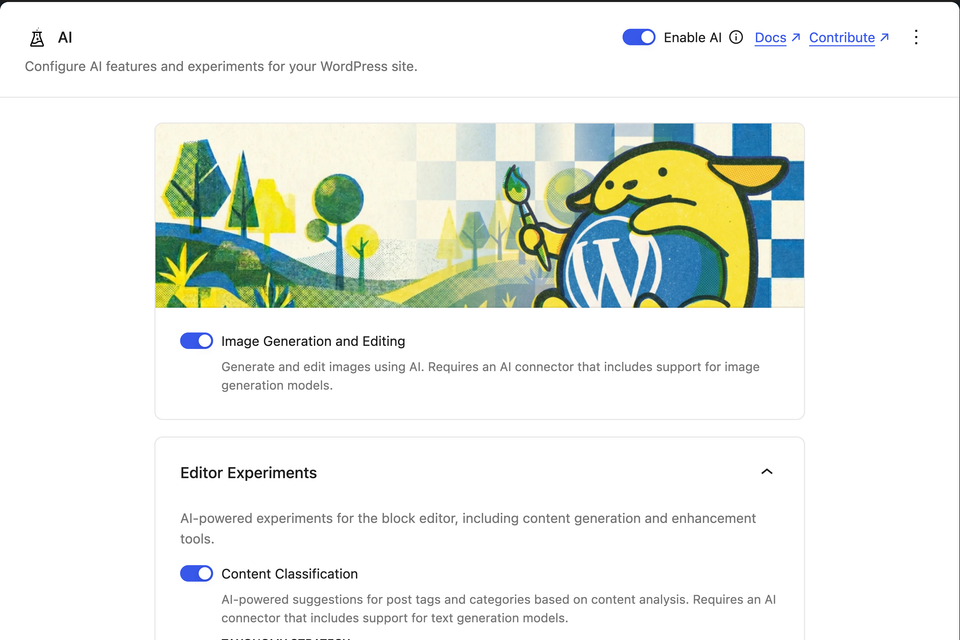
The retrieved listing identifies Image Generation and Editing as a Feature and puts other capabilities in the Experiments group. Experiments can change or disappear. The listing separately names future work, including a Content Assistant and Site Agent, in its Coming Soon section.
Use that distinction in a project brief. Write the precise task and the status of the capability that would support it. Do not sell a workflow around a roadmap label without confirming that the necessary behavior exists in the selected release.
The cover is a publisher-provided AI Settings image from the public plugin listing. It illustrates that source; it is not a screenshot of a Blitz Studio installation or proof that every pictured option exists in a reader's setup. The original image's capture date was not supplied.
Know when a request runs and what it changes
An on-demand action and an automatic workflow deserve different review records. The plugin's getting-started documentation describes automatic experiments and tools that can save changes directly. For example, it says Editorial Updates can apply notes and save a post without a preview.
Before enabling an item, record its trigger, content involved, expected result and what the editor can review before a change is saved. Use the current item's description and documentation for the installed version. Do not assume every operation is a harmless suggestion merely because it appears in an editor sidebar.
For a proposed workflow, name the person who decides whether the output is useful. A generated draft, an approved draft and a published page should remain distinct states in the team's operating record.
Identify the provider account and usage owner
The official listing says the plugin needs an AI connector and a provider account, and that provider usage is billed separately. A free plugin download does not establish free model usage.
For an evaluation, record which account will be used, who can inspect usage and who can decide whether to continue. Keep credentials out of public briefs and content records. Confirm the actual provider's capabilities and terms before relying on a particular operation; this article supplies no provider price comparison.
If an experiment runs automatically, estimate its trigger volume from the site's real workflow and then inspect actual usage during the agreed trial. Do not turn an unmeasured assumption into a cost-saving claim.
A fictional excerpt-review experiment
Consider a fictional consultancy that wants shorter article summaries for an internal editorial review. Its proposed experiment uses a small set of approved draft posts. A reviewer compares each suggested excerpt with the original and records omissions, unsupported claims and the work needed before approval.
Define an acceptance question the team can answer: does the suggestion preserve the important meaning and provide a useful starting point? Record the actual post type, installed version, provider, input, result and review method. A successful result on one draft does not establish quality across the whole library.
This is a planning example, not a plugin benchmark or a client result. The AI-built website review guide gives a broader acceptance method for claims, assets and working tasks.
Keep normal publishing responsibilities in place
A proposed image still needs an editorial purpose, accurate disclosure where appropriate and a provenance record. A generated alternative still needs review in the page's context; the image alt-text guide explains that decision.
The current plugin listing also includes slug-related experiments. Review any proposed change to an existing public URL as a migration decision, with an owner and an appropriate old-to-new destination. Use the migration URL worksheet before changing an established route.
AI assistance does not remove responsibility for accurate business facts, approved project examples, useful page structure or working links. Keep the normal content reviewer and delivery owner identifiable.
Decide whether to extend the evaluation
At the end of the agreed trial, compare actual observations with the original task. Record which capability was used, what was useful, what needed correction and what remains untested. Include observed usage when the authorized account owner can provide it.
A decision to continue should name the workflow, owner and next review trigger. A decision to stop should identify the documented way to disable that particular item and the content changes that still need review. The WordPress maintenance guide helps connect that ownership to ongoing operations.
There is no need to enable unrelated experiments to make an evaluation feel complete. Choose the smallest useful scope that gives the business real evidence.
Sources and image attribution
- WordPress.org: AI plugin.
- WordPress Core: introducing the AI Client.
- WordPress AI project: getting started.
Image source: WordPress AI project's publisher-provided Settings screenshot in the WordPress.org gallery. Retrieved 3 November 2026; the top section is cropped and resized. Original capture date unreported. No endorsement or hands-on product test is implied.
Sources checked 3 November 2026. Feature status can change; check current documentation and the installed release before implementation. The consultancy example is fictional. No productivity, accessibility or ranking improvement is claimed.

The Blitz Studio team
We design brands, build websites and engineer digital products.
Talk about your next project