The quick answer
A small content hub needs a clear search promise: what material can be found, how filters affect the result and what a visitor can do when nothing matches. Start with the content and a few realistic tasks before choosing a more complicated search service.
A small content hub needs a clear search promise: what material can be found, how filters affect the result and what a visitor can do when nothing matches. Start with the content and a few realistic tasks before choosing a more complicated search service.
This guide is a planning method with three scoped observations of Blitz Studio’s existing blog search. Those checks are not a relevance benchmark, a screen-reader assessment or proof of a search ranking outcome. A downloadable matrix records the observations and gives you a blank case to adapt.
Define what the search covers
Decide whether the search includes article titles, summaries, tags, full article text, resources or several types of content. A search box does not automatically search everything the visitor can read on the site. Explain the scope through its location, label and result presentation.
For a compact editorial hub, searching its article cards may be a reasonable starting point. A larger documentation site may need full-text retrieval, version handling and stronger relevance controls. Choose the system that can answer the actual task rather than promising capabilities you have not implemented.
List what is deliberately excluded and how a visitor can reach it. If the blog and resources have separate searches, make that boundary understandable. Do not make the visitor guess whether a missing worksheet is absent from the site or simply outside the current search area.
Choose query cases from useful tasks
Create a small set of cases: a known title or distinctive phrase, a broader topic, a visitor synonym, a misspelling, an unmatched term and a reset. Include a query combined with a filter when the interface offers filters.
Mark each expected behavior before the test. A synonym may be a planned capability rather than something the current system supports. If the implementation matches words literally, record that limit instead of presenting it as semantic search.
Use actual visitor questions when authorized evidence is available, and label team-generated cases as hypotheses. Keep private queries or personal details out of a public test artifact. A deliberately unusual unmatched string is useful for checking an empty state, but it is not evidence of visitor demand.
Make the result understandable
A result should help the visitor judge whether to open it: a recognizable title, a short description and the relevant content type are often enough. Avoid making every result look identical when articles, tools and downloads have different purposes.
Clarify whether the interface is filtering a list or ranking retrieved documents. If there is no ranking model, do not describe the first card as the most relevant answer. Decide how featured content behaves while a query is active so that a visitor can distinguish the result set from promotion.
Filters should also be visible as part of the search state. A query can produce no matches because a category remains selected. Provide a way to understand or clear that combination rather than encouraging the visitor to keep rewriting the same term.
Design the zero-result and reset paths
A useful empty state identifies that nothing matched the current query and filters, then offers a sensible recovery action. Depending on the interface, that might be clearing a filter, editing the term or returning to the full list. Do not imply that content does not exist anywhere merely because this particular search did not find it.
Check what happens after the recovery control is used. Does the text field clear, does the filter reset and is the visitor able to continue? Also decide whether the query can be shared or restored through the URL, and verify that behavior if it is part of the design.
The recovery should preserve a usable path to browsing. Search can complement topic pages and internal links; it should not become the only way to reach important content.
Keep status messages available to assistive technology
W3C’s guidance for Status Messages, success criterion 4.1.3 at Level AA, distinguishes a result list from a short message about the result. Messages such as a result count or a no-results update can need programmatic status semantics when they appear without taking focus or refreshing the page.
That is a reason to inspect the actual implementation with the intended interaction, not a reason to claim that a visible count proves accessibility. Test the accessible name of the search control, keyboard use, focus and announcement behavior in scope. Record the browser and assistive technology used, or leave that part explicitly not_tested.
Keep routine feedback proportionate. A visible count, a loading message and a failed request describe different states. Do not show a confident zero-result message when the search request actually failed.
Three limited observations from our public blog
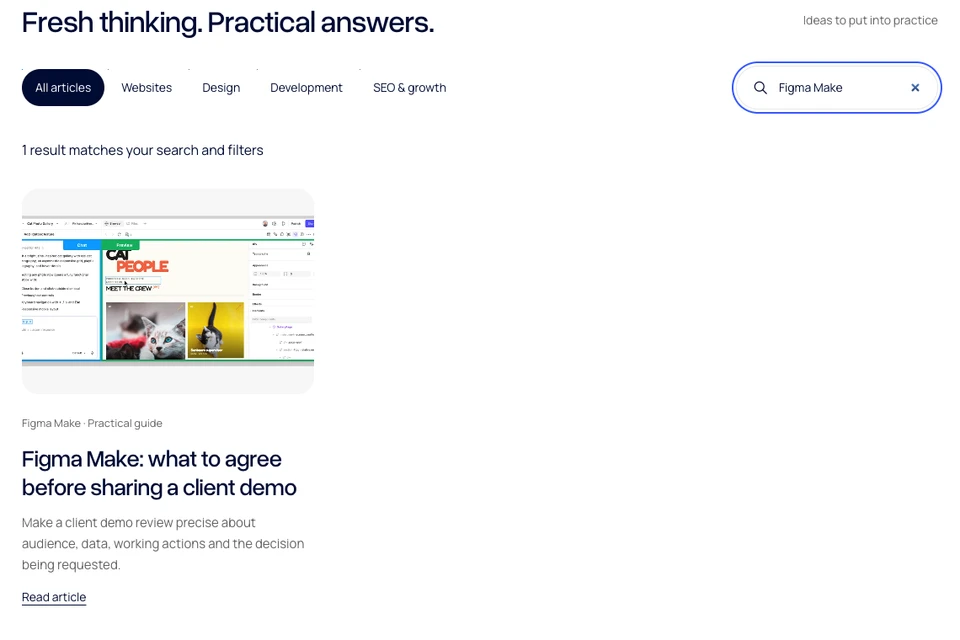
On 9 November 2026, before this batch was published, a browser check of our public blog search recorded one result for “Figma Make,” zero results for the synthetic query “qzxmissing20261109,” and 28 cards after clearing the query. All observations used the default all-articles filter.
The matching card was the existing Figma Make client-demo guide. The count of 28 is the pre-publication snapshot, not a promise about the current inventory after new articles are added. The screenshot shows that actual filtered view. The check did not assess synonyms, typo tolerance, relevance ordering, persistence, screen-reader output or every filter combination.
Use the search planning and query-test worksheet for the timestamped CSV records and a blank test case. Update the content baseline when you rerun a case; a list count is expected to change when the hub grows.
Review the search as content changes
Assign someone to review the query set after a meaningful content or interface change. Check that new pages enter the intended scope, retired content does not remain a dead end and edited titles still help visitors recognize an answer.
A small accurate matrix is more useful than a blanket “search works” statement. Record the query, filter, intended outcome, actual result and limits, then choose the next change from the evidence you have.
Primary accessibility reference: W3C Understanding Status Messages, checked 9 November 2026. The planning framework is original editorial guidance; the three public observations are scoped UI checks, not private analytics or a complete accessibility audit.

The Blitz Studio team
We design brands, build websites and engineer digital products.
Talk about your next project