The quick answer
Connecting a v0 project to GitHub changes the way its code is maintained and published. Before using that connection for a business website, agree who owns the repository, which branch is the release target and who reviews a change before it becomes public.
Connecting a v0 project to GitHub changes the way its code is maintained and published. Before using that connection for a business website, agree who owns the repository, which branch is the release target and who reviews a change before it becomes public.
This guide explains the current documented workflow and a practical ownership handoff. We did not connect a project, generate code or test a deployment for this article. Product facts were checked against official v0 documentation on 10 November 2026; the business examples below are fictional.
Decide where the maintained code belongs
v0’s GitHub guide says that a connected repository becomes the source of truth for the project’s code. Treat the repository as an asset the business must be able to maintain, rather than a convenient link attached to one person’s chat.
Record the account or organization that should own it, who administers access and who can continue the work when the original builder is unavailable. These are project decisions, not questions an AI prompt should silently settle. Confirm the chosen account in the actual connection flow before creating or connecting a repository.
If an existing website is already maintained in a repository, identify that starting point and its release process. Do not create a second repository merely because it is easier to find. Explain whether the work is a new project, a proposed replacement or a contribution to an existing codebase.
Understand the branch names in plain language
The current guide distinguishes a base branch, a working branch and the production branch configured for deployment. A connected chat starts from its selected base; generated changes are pushed to its working branch. The branch used for production deployment is a separate configuration decision.
For a business owner, the useful question is: “Where does this proposed change go, and what action would make it public?” Ask the implementer to identify the actual names and deployment target for your project. Do not assume that a familiar branch name necessarily has the role you expect.
A fictional campaign site might use a working branch to review a revised enquiry page while the public site continues from its configured release branch. That example describes an intended separation; it is not evidence that a particular project has been configured that way.
Treat Publish as a release action
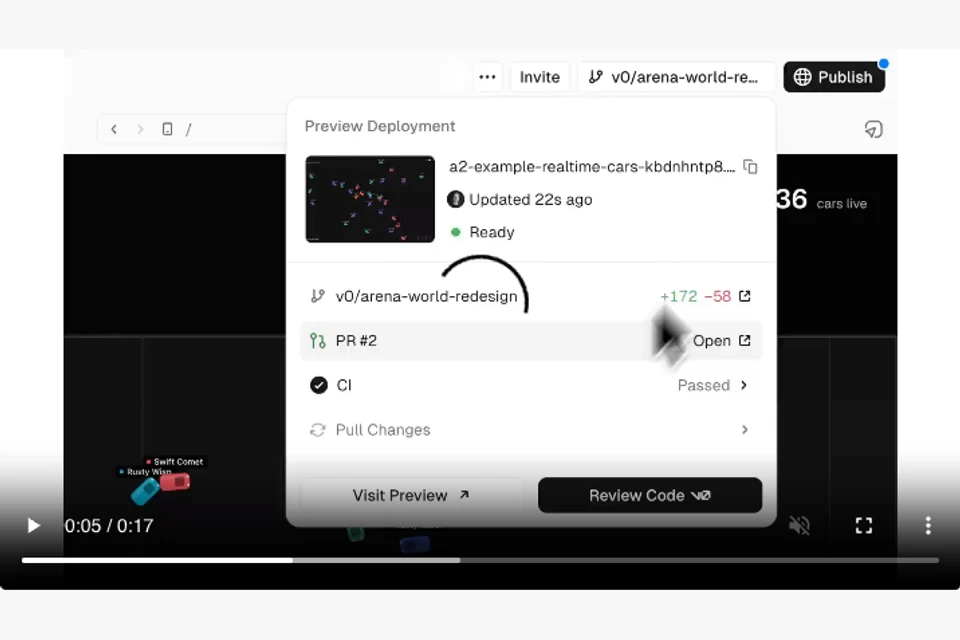
According to the current GitHub guide, v0’s Publish flow creates or reuses a pull request, merges it into the base branch and waits for production deployment. This is more than sending someone a preview URL. Review the actual target and any confirmation before publishing.
A preview helps inspect a proposal. A pull request records the change being considered. A successful deployment establishes that a version was delivered. None of those alone proves that the website’s forms, content or business process work as intended.
Agree the acceptance check before the first release. For an enquiry-page change, that might include the approved wording, mobile presentation, keyboard use, actual submission outcome and a recoverable failure state. Keep the evidence attached to the version being released rather than describing a preview as a completed production check.
Keep reviews and required checks meaningful
The vendor documents that repository rules, required checks and reviews can block a merge. Decide which checks actually matter for the site and who is responsible for resolving a failure. A green indicator is useful only when the team understands what it checked.
For a small content website, the review might cover the build, links, public routes, page metadata and the changed visitor task. For an application with accounts or payments, the release scope is different. Do not copy an unrelated checklist and call it sufficient for every project.
If publishing is blocked, preserve the proposed change and read the actual requirement. Complete the appropriate review or fix instead of treating the blocker as a reason to bypass the project’s agreed process. Record the unresolved issue and owner when work cannot be released yet.
Separate code access from deployment permission
v0’s documentation notes that GitHub synchronization and deployment permissions are not the same grant. Confirm the actual roles needed for the intended workflow rather than assuming repository access covers every publishing route.
The handoff should identify the code owner, hosting project, domain owner and person who can authorize a public release. It should also explain where environment-specific configuration is managed without copying credentials into the handoff document.
If another developer works locally, agree how changes return to the shared repository and how the builder receives updates. The current v0 FAQ describes collaboration through that shared GitHub repository. The practical objective is one understood maintenance path, not several competing copies of the site.
Record a release that someone else can understand
Keep a compact record containing:
- Repository and responsible owner.
- Base, working and configured production branches.
- Preview and production URLs, with their different purposes.
- Change description and reviewer.
- Checks actually run and their limits.
- Release version, deployment result and observed visitor task.
- Recovery owner and remaining work.
Do not put secrets in this record. If the site moves to another deployment workflow, update the record to reflect that actual arrangement. v0’s FAQ says code can be exported and deployed elsewhere, but portability is not evidence that a migration or a new deployment has been verified.
Primary sources and next steps
Read the current v0 GitHub workflow guide and v0 FAQs for product behavior and connection details. This is a current-tool editorial topic, not a claim about popularity, search volume or a newly announced release.
Use the website brief template to establish ownership and scope, then the AI-built website review guide for the real acceptance task. If old URLs will move, plan them with the migration URL worksheet.

The Blitz Studio team
We design brands, build websites and engineer digital products.
Talk about your next project